Showing posts with label edtech. Show all posts

Thursday, 21 April 2016

After the Video: Classroom Activities to do In the Flipped Lesson


For some time now I have been making flipped videos for my class. It's great and I love having extra time in class to do more exciting activities. However, I do find thinking of the exciting and useful activities the hardest part of the flipped learning business. Therefore I have decided to document the ideas which I have used (or want to use) with my primary class.

I try to bear Blooms Taxonomy in mind when including activities to my lessons. If it isn't from the top branches, I generally don't bother with a flipped lesson.


So here are some ideas:

  • Create a TV Quiz about the topic...maybe not Numberwang though


  • Play Just a Minute

  • Create a board game
  • Design a lesson for another class about the topic
  • Create an Infographic

  • Make a model of it


  • Write an editorial about the topic - evaluating both sides of an argument
  • Create a quiz - I love Kahoot for this
There are, of course, lots of other great things we could do in our classes. I want to add to this collection - any ideas? Please drop me a line: @DerEyken or mrvandereyken@gmail.com  


Friday, 11 March 2016

Making Flipped Videos For The Primary Classroom

After a few years (how time flies!) of experimenting with this flipped teaching idea, I thought that I would summarise what I have learnt/discovered so far.

First of all, flipping your lessons in a primary environment does work and is worth it. However, us primary teachers have the same children all day, every day and it is not as if we teach the same lesson to groups of different students as our secondary colleagues, for whom flipped learning has more obvious benefits.

After reading this wonderful blog post by Chris Waterworth, I thought it was time I added my thoughts. I know some teachers lie to use videos that they find on the net,but I much prefer to make my own as I can tailor them to the exact requirements of my class. After a few tries, they are easy and quick to make and I would recommend this to all primary practitioners.

So here is my guide to making flipped videos for the primary classroom:

  1. Only consider it for lessons where the time saved in class is going to be put to something worthwhile not just extra or harder 'work' - use if you want the class to make something or create a play etc. Perfect to reach those higher levels of Bloom's Taxonomy which you might not normally have time for.
  2. Don't flip every lesson - everything gets dull after time. I aim to flip a lesson once a week but it depends on my lesson objectives.
  3. Videos need to be short and easy to make. they don't expect nor want The Force Awakens: The Fractions Sequel. I use screencast-o-matic to narrate over flipcharts and presentations - you can use it straight from the website or download the app. just plug in your mic and talk. No messing about with transitions, music, titles etc.
  4. Place videos somewhere safe: Google Drive, Edpuzzle or Blendspace (I love Blendspace) where they can watch safely. Avoid YouTube unless you are 100% sure that all they can see is your video. And even then...
  5. Add an interactive element - a quiz or feedback form so you can see what they have understood.
  6. It's OK to share in class rather than homework. Took me a while to get this but for younger students, you still save a lot of time if they watch a video individually in class. And they can refer back to it if they get stuck later.
  7. The videos make perfect revision resources and ways to inform parents of what is going on in their children's lessons.
We are now increasingly using flipped teaching for homework activities and I find it a very useful tool to create extra time in the classroom to embed and master the subject.

It is also great fun! 

Wednesday, 13 January 2016

My Flip Videos

I now post most of my flip videos on to my Google Drive and these are automatically shared with my class from there. However, I thought it might be useful to post a couple of examples on this blog as a record of how they have changed over time.

I use 'Screencast-o-matic' to capture my computer screen and it also allows me to record audio. It's also free and you can either download it or it will will work direct from the web. My videos are simple, straight to the point and I no longer worry about making small errors on them. I find that the class need the video just to deliver the key learning point and, in class, we can work together to develop and embed that understanding.

So here is one I made today for our science lesson this afternoon about shadows. In the lesson, the children will be making a shadow puppet of themselves and then creating a puppet play of a lesson that teaches about how shadows work! Should be fun...


I generally find maths is an easier subject to make videos for as it is so fact and process-based. The vast majority of my flip videos are for maths but this is something I am seeking to change. As I teach Year 6 children, I aim to make my videos no longer than 6 minutes long...Year 5 would be 5 minutes etc. I think that is a fairly good rule of thumb.


I'm happy to share more of my videos - just drop me an email at mrvandereyken@gmail.com

Wednesday, 30 December 2015

BYOD and Flipped Teaching Update

Badly amiss of me not to have updated this blog since August! However, it's been a very interesting term in our development of BYOD in our school and with my class so it's worth a summary,

My new Year 6 class came up to me having used iPads and devices in class while in Year 5 though not to the extent that I had been using them with my previous class. I also found that not all of the class had devices unlike last year. Luckily our school does have a few spare iPads which I could use but I also paired children up to share devices where necessary.

From January 21016, each child in Y2-Y6 will need to come to school with an iPad. Whereas Y5 and 6 have been using the since February 2015, it is going to be a radical learning curve for a lot of our teachers/students/parents in a few weeks time. Therefore, this term, we have been undertaking a lot of training and experiments so that we are ready for January. Google EdTech team have been out for a training day as Google Drive forms the backbone of how we intend to use technology.

My classroom practice has developed this term as the initial euphoria about iPads and devices has worn off and I have noticed that these devices have become much more seen as an everyday tool by the children - sort of a very expensive pencil case.

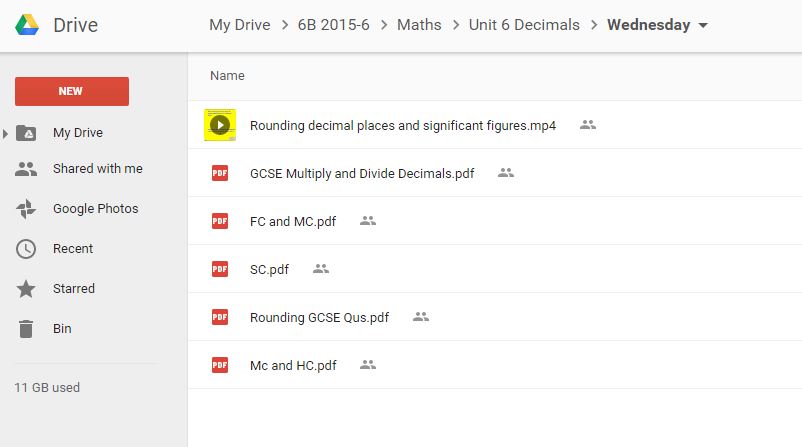
I have become much more selective in how I use them. Google Drive I find is by far the best way to share work and messages with my class. I have a shared folder for my class which contains subject folders; activities fro each lesson and sometimes a tutorial or flipped video.


The use of Drive also changes how my class communicate with me. This may not to be every teachers liking but they use Gmail to message me in the evenings and at weekends if they are stuck about their work. I could choose not to reply but I think this accurately mirrors how work is changing in the real world around us so I am usually happy to reply if I have the time.

I have learnt that very quickly your Drive becomes full of work shared by the class so I have begun using Google Classroom (bundled with Drive) as a means of setting and monitoring tasks. I love this as it automatically creates a folder in my drive for each activity and saves their work with their name in it! It's also good for sending messages to my whole class.

I have been using apps much less. I now rely on just a few. i have found that many apps can be great for a one-off 'Wow' effect but they soon wear off and I found that I was teaching how to use the app rather than the curriculum content.

I use video a lot for my class to make videos of their work - recording their poetry and such. I also ask them to occasionally make a video explaining how they did some work in their boos and then QR code it which is then stuck into their book with their work. I never ask them to write using their devices - more trouble than it is worth! 

I still make flipped videos although i now use them in my class rather than doing my usual spiel at the board or I use them as a resource for he children if they get stuck. As they are on drive, they have access to these all the time.

I have begun using Edpuzzle which allows you to add questions to your videos as well as to narrate over videos which you have found elsewhere such as YouTube. I really like this as it makes the watcher an active participant and you can also monitor their progress. 

I am hoping to use Edpuzzle more next term for flipped videos and homework activities.

I do occasionally use other apps but only if I feel that they enhance learning. For example, we recently went on a trip around Bahrain to learn about the ancient Dilmun civilization which was here 3000 years ago and the children had to write a summary of their learning. I used Thinglink for this as it enabled the children to easily incorporate all the videos and photos they had made of the trip and to share them to the rest of the class and their family. Sometimes I feel technology can obscure the subject learning so I have to choose how to use apps and software carefully - high impact, low effort!
You can see this Thinglink at https://www.thinglink.com/scene/727463012406919168

Online assessment is still a key feature of my use of technology. I still use Kahoot - especially getting my class to design their own quizzes. This works really well with spelling lists as they have to come up with incorrect but plausible spellings! Increasingly we are using Socrative as it is better at keeping data and enables you to set a wider range of questions - we are presently transferring reading comprehensions on to Socrative for use next term.

Next term, my aim will be to develop flipped videos using Edpuzzle. Flipped teaching has taken a bit of a backseat recently but it is something I now want to return to as I feel that iPads are now firmly established in the day-to-day running of my class.